
Talk to your assistant and hear it answer
Most mainstream voice assistants work the same way. Your microphone audio goes to a company's servers, gets transcribed there, and an answer comes back. That is the part most people quietly dislike, and it is also why voice stops working the moment your connection does.
InnerZero runs the whole loop on your machine. Local speech recognition turns your voice into text, a local model works out the answer, and a local voice reads it back. Nothing is uploaded, and it keeps working with the network off. There is an optional cloud voice mode if you want a more natural one, and it stays off until you turn it on.
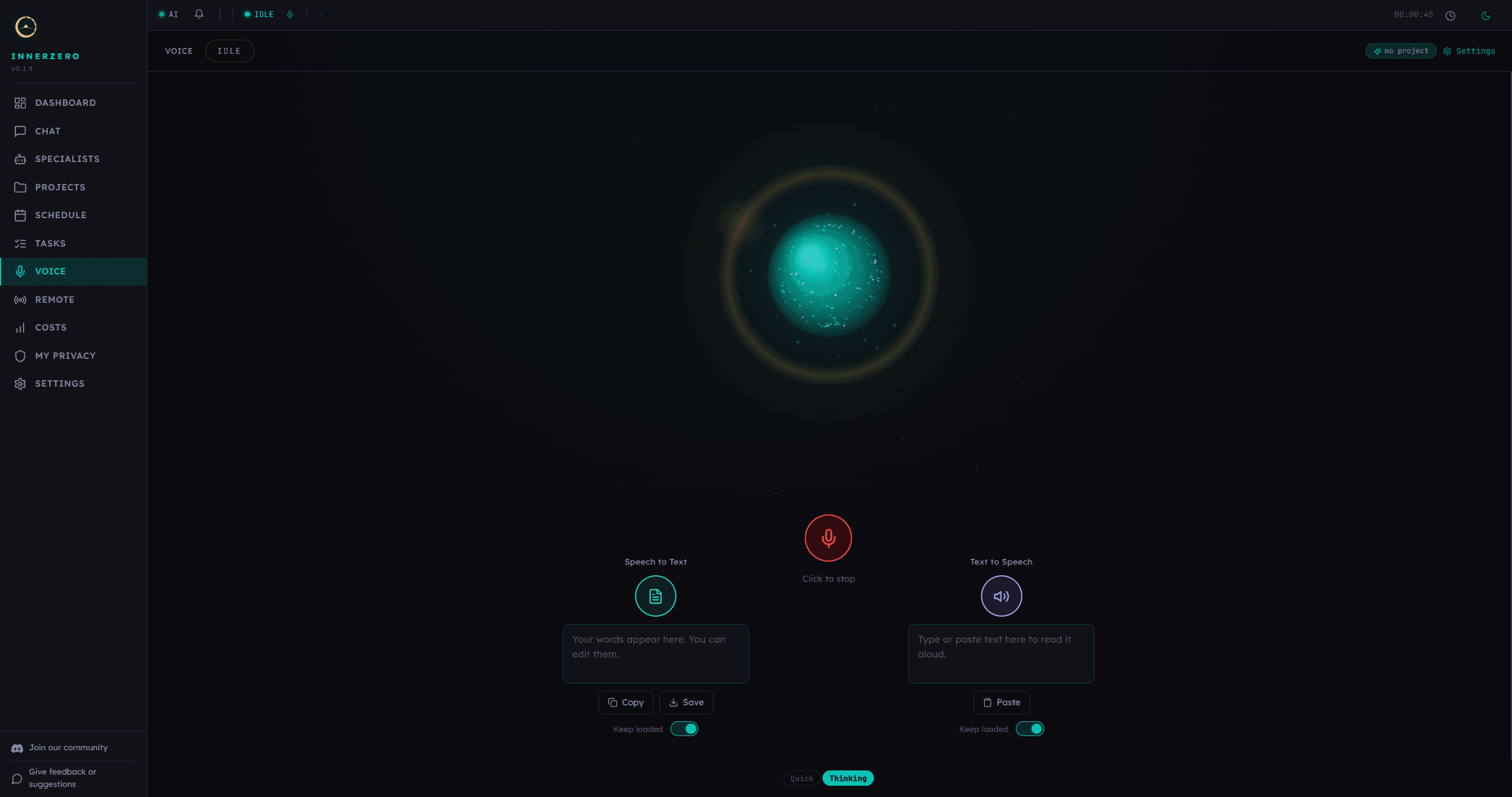
The Voice page. Full voice mode in the centre, with standalone transcribe and read-aloud panels either side.
What is included
Full spoken conversation
The Voice page puts a large orb in the centre with a microphone button beneath it. Press it and the label changes to Click to stop, the orb reacts to what it hears, and a state badge moves through LISTENING, THINKING and SPEAKING so you always know where the turn has got to. Zero answers out loud and the exchange appears in a transcript below, with a Quick or Thinking toggle for how much reasoning to spend on the reply. Each spoken exchange is saved to memory tagged as voice, filed under whichever project is active.
Speech recognition on your own machine
Your microphone audio is transcribed by faster-whisper running on your hardware, so no recording goes to a transcription service. It uses your GPU when one is available and drops to CPU automatically if the GPU load fails, so a machine without a graphics card still works. Settings holds the model size, with five options running from Large V3, the most accurate, down to Base, trading accuracy against memory use. The recogniser is told which language you selected for the interface rather than being left to guess at it.
A speaking voice that needs no internet
Spoken replies are synthesised locally with Kokoro, so the output side is as offline as the input side. Settings holds the voice picker and a speech speed slider from 0.5x to 2x, plus an audio mode switch: Headset turns echo suppression off for lower latency, and Speaker + Mic turns on echo cancellation so Zero does not hear itself back through your speakers. You can also choose which microphone and speaker to use, and set how long a silence has to run before Zero decides you have finished talking.
Speech to Text panel
The left panel is transcription on its own, with no conversation attached. Press its button, talk, and your words land in a box that reads "Your words appear here. You can edit them", because the point is that you can fix a misheard name before you use the text anywhere. Copy puts it on the clipboard and Save writes it to a file on your PC. A Keep loaded switch holds the recognition model in memory so the next transcribe starts instantly rather than warming up again, and it is off by default because it costs memory. The chat box has two microphone buttons of its own if you would rather not open this page, one that dictates into the message box and one that starts a full voice conversation without leaving chat.
Text to Speech panel
The right panel does the opposite job. Type or paste anything into the box and Zero reads it aloud, with a Paste button for text from elsewhere and its own Keep loaded switch for the voice model. Reading a draft back is one of the fastest ways to catch a clumsy sentence your eyes skim over, and it helps if you take writing in more easily by ear. Loading and stopping are shown explicitly, so a slow first model load never looks like the app has hung.
Instant answers for the everyday things
Some spoken questions never need a language model at all. Ask the time or date, set a timer or countdown, do a sum, ask for a definition, check the weather, or ask about your CPU, RAM or disk, and the matching tool answers straight away. These shortcuts bypass the model entirely, so they are fast, repeatable, and a simple sum is never handed to a cloud provider to get wrong. Anything else that matches a spoken category, such as a reminder or a note, hands off to the local model and its tool loop instead. Calendar and email are not spoken categories yet, and anything that needs an approval step is a chat job today, because the voice side has no approve or deny control.
Optional cloud voices
If you want a more natural voice than the local one, cloud voice routes part of the turn through OpenAI. It is off by default and needs Cloud Mode on, plus either your own OpenAI key or an InnerZero plan with credits. With your own key the default keeps transcription local and sends only text. On an InnerZero plan, and on the optional raw-audio setting with your own key, your microphone audio streams straight to OpenAI instead, which is why InnerZero will not start cloud voice until you have acknowledged a one-time notice about it. There are 13 ChatGPT voices to choose from, and with your own key you also pick between a cheaper split mode and a bundled higher quality one. Any cloud failure falls back to the local voice rather than dropping the answer, and Offline mode and Private mode block it outright.
Where voice covers less than the interface
The interface runs in 26 languages and voice does not stretch that far yet. Speech recognition follows the language you picked, so dictation and the transcribe panel are not limited to English. Full spoken conversation with the local voice model is English only today, and on any other interface language the Voice page says so on screen and points at cloud voice as the multi-language route. It is stated up front rather than left for you to discover halfway through a sentence.
Step-by-step guides
Walkthroughs for setting this up and getting the most from it.
Talk to Your AI: Voice Mode in InnerZero
The walkthrough for starting voice mode and what a spoken back-and-forth actually feels like.
Free Local Text-to-Speech and Speech-to-Text on Your PC
How the two standalone panels work, and when to use them instead of full voice mode.
Best Local Private Voice AI Assistant for PC in 2026: Ollama, LM Studio, Jan, Whisper, Piper Compared
How InnerZero's voice stack compares with assembling Whisper and Piper around a local model yourself.
The Best AI Voice Assistant for PC in 2026: A Realistic Jarvis
What a desktop voice assistant can genuinely do today, and where the film version stops being real.
Frequently asked questions
Does InnerZero send my voice recordings to the cloud?
Not with the local voice pipeline, which is the default. Speech recognition and text to speech both run on your own machine, so no microphone audio is uploaded to a transcription or synthesis service. Cloud voice is a separate optional feature that is off until you enable it. On an InnerZero plan, and on the optional raw-audio setting with your own key, your microphone audio does go to OpenAI. InnerZero shows a one-time notice about that before cloud voice starts, and Offline mode and Private mode block it entirely.
Does voice work without an internet connection?
Yes. The local speech recognition model, the local voice model and the local text to speech voice all run on your hardware, so a full spoken exchange works with the network off. Cloud voice and any tool that fetches live data, such as weather, need a connection.
Do I need a graphics card to use voice?
No. Speech recognition uses your GPU when one is available and falls back to CPU automatically if the GPU load fails. Settings lets you choose a smaller recognition model if the largest one is heavy on your machine, and there are Keep loaded switches that trade memory for a faster start.
Can I use the transcribe and read-aloud panels while voice mode is running?
No, and that is deliberate. The panels and full voice mode share your microphone and speaker, so only one of them owns the audio at a time. If you try to start a second one, InnerZero says which one to stop first rather than producing two overlapping streams.
Does voice work in all 26 interface languages?
No. Speech recognition follows the interface language you selected, but full spoken conversation with the local voice model is English only today. On any other interface language the Voice page shows a notice saying so and points at cloud voice as the multi-language option.
Is cloud voice covered by the Privacy Blacklist?
Not for the audio itself. The Privacy Blacklist scrubs text before it leaves your machine and raw speech cannot be scrubbed that way, so InnerZero shows a one-time notice explaining this and will not start cloud voice until you acknowledge it. Offline mode and Private mode block cloud voice entirely, and the typed read-aloud panel falls back to the local voice whenever the blacklist is active.