
Make InnerZero look and behave the way you want
Most assistants offer a light mode and call that customisation. The settings that actually change how the thing feels to live with, the tone of the replies, which tools it is allowed to touch, where files land, and which engine runs the model, are usually decided for you and left alone.
InnerZero puts all of those in Settings. Themes, personality, per-tool switches, output location, hardware profile, the local engine, and whether the app opens at login are yours to change, and none of it needs a reinstall.
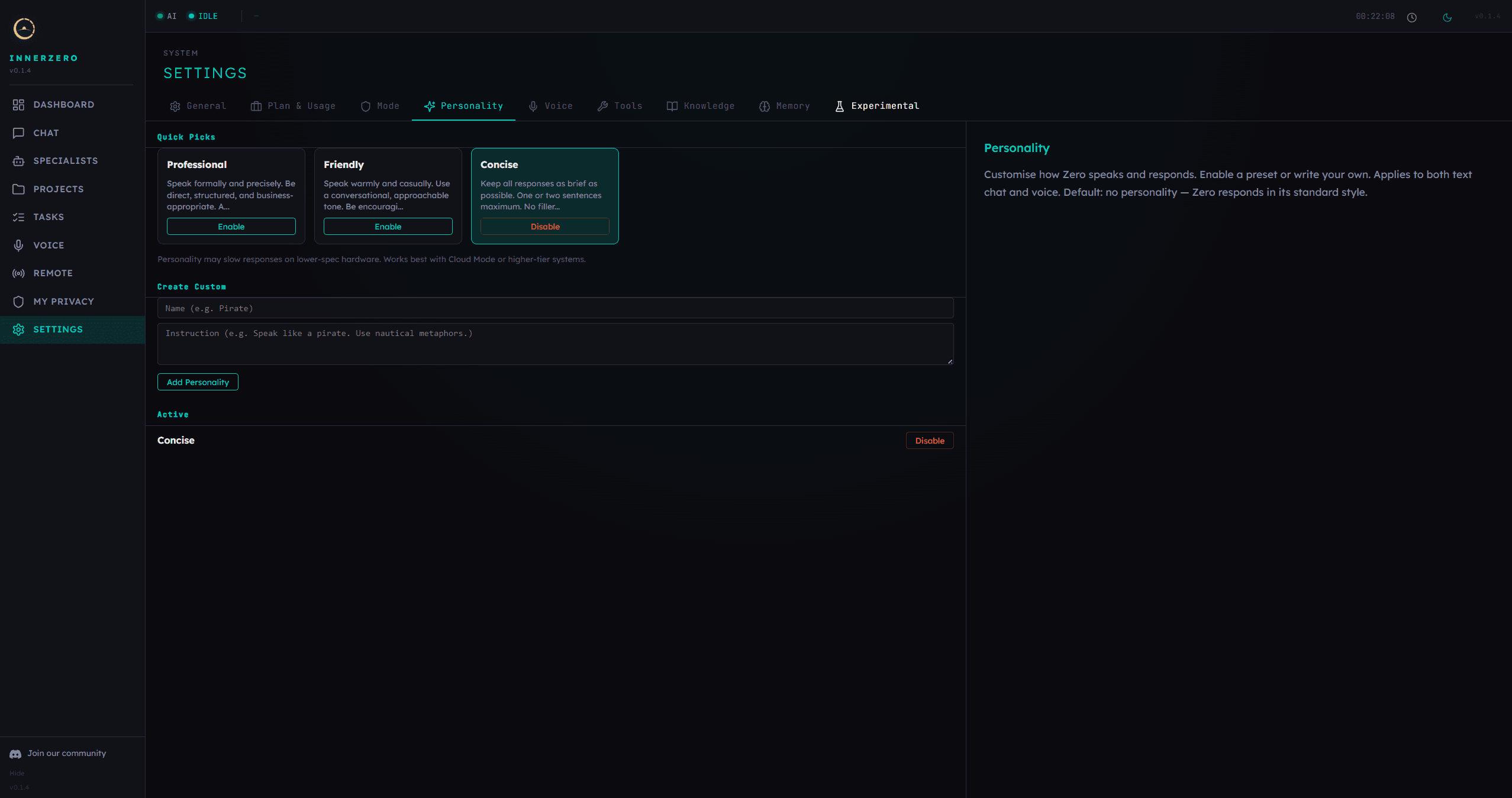
Choose a prebuilt personality or write your own. It applies to both text chat and voice.
What is included
Eleven themes, including two animated ones
Dark Zero is the default, with Light Zero, Soft Pink, Dark Teal, Classic Carbon, and the new High Contrast alongside it. High Contrast pairs a true-black background with maximum-contrast text for low-vision use. The grid starts with three visible and a More themes control opens the rest, so the list is short until you go looking. Golden Pro, Matrix Green, Arctic White, and Tactical Red are the Pro themes, and Neon Tokyo is a separate exclusive one that unlocks with a code rather than a subscription. Golden Pro draws a slow gold starfield behind the app, which is rendered as static dots instead of an animation when your system asks for reduced motion, and Neon Tokyo draws a receding neon grid.
An AI personality you can write yourself
A personality changes the tone of the replies, not the facts behind them. Professional, Friendly, and Concise ship with the free app, and a custom one is just a name and an instruction, for example speak like a pirate and use nautical metaphors. Whatever you enable applies to text chat and to voice, and the default is none at all, so Zero answers in its standard style until you choose otherwise. A fixed internal note sits alongside any active personality so it can shape tone without overriding Zero's core identity or its safety rules.
InnerZero Pro is optional and offline
Pro is a membership for the desktop app itself, and it is a different thing from the cloud AI plans, which buy online model access. It unlocks the premium themes and six more personality presets, Coach, Mentor, Executive, Storyteller, Pirate, and Nerd, it opens seven Pro-only briefing templates including Daily news update, Focus plan, and Monthly review, and it lifts the free app's limits of three custom personalities and five of your own proactive briefings. The entitlement check reads a locally cached record and never makes a network call, so Pro keeps working with the machine offline. The limits only ever apply when you create something new, so nothing you already made is taken away. Pricing is on the pricing page.
Turn individual tools off
The Tools tab lists every tool Zero can call, grouped by category, each with a plain description of what it does and a switch. Everything is on by default, and a disabled tool is left out of the list Zero is offered in chat and voice, so it does not turn up in a plan there rather than being offered and then refused. The one exception is attaching a document, which always offers the file-writing tool so Zero can produce a file from what you attached. Scheduled proactive briefings are separate: they run against their own fixed allowlist of tools. Reset to Defaults puts the whole list back in one step. The same tab is where you pick the web search provider.
Choose where Zero saves files
Files Zero writes, downloads, and notes all land in one output folder, which defaults to an InnerZero folder inside your Documents. A native folder picker lets you move it anywhere inside your own home folder, and system locations such as Windows and Program Files are refused rather than silently accepted. When a project is active, new files are filed into a subfolder named after that project instead of piling up in one directory. A Default button puts the location back.
Hardware profiles, auto-detected or overridden
Setup reads your CPU, RAM, GPU, and free disk space and assigns a profile, and that profile decides which local models are installed and how much context they run with. If the detection was wrong or the machine has changed, Manual Profiles shows every tier with its requirements so you can compare them, and switching is explicit: you see which models would be downloaded, roughly how much disk that needs, and whether you have the space before you confirm. There is a Re-test GPU button for after a driver update. An existing setup always wins over fresh detection, so an update will not quietly replace the model you are already running.
Ollama, LM Studio, or your own llama.cpp server
Ollama is the default and InnerZero manages its models for you, including the download during setup. LM Studio and llama.cpp are the alternatives, picked as cards in Settings under AI and Models; with either of those you load models yourself and InnerZero uses whatever is loaded, discovering them over the engine's OpenAI-compatible API. Switching is a click on the other card with no reinstall, and your memories and settings are kept. There is also a No Local Model tier for people who run inference somewhere else entirely. Chat, voice, and the AI specialists stop working on that tier, but the schedule, tasks, projects, memory, and knowledge packs all stay.
Point at Ollama on another machine
The Ollama connection defaults to localhost but accepts any URL, so a laptop can use a GPU machine elsewhere on your network. A Test button reports whether it connected and how many models it can see, and the change asks for a restart to take full effect. Your remote Ollama has to be listening on 0.0.0.0, and if the address looks public InnerZero says so, because Ollama has no built-in authentication and wants a firewall, reverse proxy, or VPN in front of it. Separately, you can choose between the Ollama bundled with InnerZero and one already installed on your system.
Open at login on Windows, macOS, and Linux
One switch in Settings under General registers InnerZero with the operating system's own startup mechanism: a per-user registry entry on Windows, a launch agent on macOS, and an autostart entry on Linux. It is off by default and needs no administrator rights, no UAC prompt, and no sudo, because everything it writes is inside your own user account. Turning it off removes the entry, and the Windows uninstaller clears it as well. The control is only active in the installed app.
Step-by-step guides
Walkthroughs for setting this up and getting the most from it.
How to Customise Your Local AI Assistant: Themes, Voice, and Tools
The walkthrough for changing themes, personality, voice, and tool switches in the app.
Use llama.cpp with InnerZero: Bring Your Own llama-server
How to point InnerZero at your own llama-server and pick the GGUF file it loads.
Running Ollama on a Remote Machine With InnerZero
Connecting a laptop to Ollama on a home server or GPU workstation, and securing it.
What AI Models Does InnerZero Use?
Which open models sit behind chat, voice, and speech recognition, in plain English.
Frequently asked questions
How many themes does InnerZero have?
Eleven. Dark Zero, Light Zero, Soft Pink, Dark Teal, Classic Carbon, and High Contrast come with the free app. Golden Pro, Matrix Green, Arctic White, and Tactical Red are premium themes included with InnerZero Pro, and Neon Tokyo is an exclusive theme that unlocks with a code.
Can I change how the AI talks to me?
Yes. Settings has a Personality tab with Professional, Friendly, and Concise presets, and you can create your own by giving it a name and an instruction. Whichever you enable applies to text chat and to voice. The default is no personality at all, so Zero uses its standard style until you turn one on.
Is InnerZero Pro the same thing as a cloud plan?
No. InnerZero Pro is an optional membership for the desktop app that unlocks premium themes, extra personality presets, seven Pro-only proactive briefing templates, and higher limits on custom personalities and proactive briefings. It works fully offline because the entitlement check is local. Cloud AI plans are separate and buy online model access.
Can I stop the AI from using certain tools?
Yes. The Tools tab in Settings lists every tool with a description and a switch. All tools are on by default, and a disabled tool is left out of the list Zero is offered in chat and voice, so it is not offered there in the first place rather than offered and refused. Attaching a document is the one exception: the file-writing tool is always offered on that turn. Scheduled proactive briefings use their own separate allowlist. Reset to Defaults turns them all back on.
Can I use LM Studio or llama.cpp instead of Ollama?
Yes. Settings under AI and Models has three engine cards: Ollama, LM Studio, and llama.cpp. Switching does not need a reinstall and your memories and settings are kept. With LM Studio or llama.cpp you load the model yourself and InnerZero uses whatever is loaded.
Does InnerZero start automatically when I sign in?
Only if you turn that on. The Open at login switch in Settings under General is off by default and works on Windows, macOS, and Linux. It writes an entry inside your own user account, so it needs no administrator rights, and switching it off removes the entry again.
Explore more
- Easy SetupDouble-click an installer and a wizard does the rest. No terminal, no Docker, no config files.
- AI ChatStreaming local chat with slash commands, attachments, and export to real documents.
- VoiceFull spoken conversation, plus standalone transcribe and read-aloud panels, all running locally.
- All features