
An assistant that remembers what you told it last month
Most assistants meet you as a stranger every time. You re-explain your job, your project, and how you like answers written, and none of it survives the tab closing. The ones that do remember keep those notes on their own servers, which puts a limit on how honest you are willing to be with them.
InnerZero keeps its memory in a database file on your machine. It reads back the parts that matter to the message you just sent, works through what it has learned while the app sits idle once you switch that on, and shows you your recent memories and everything you have archived in Settings, so you can archive or permanently delete them.
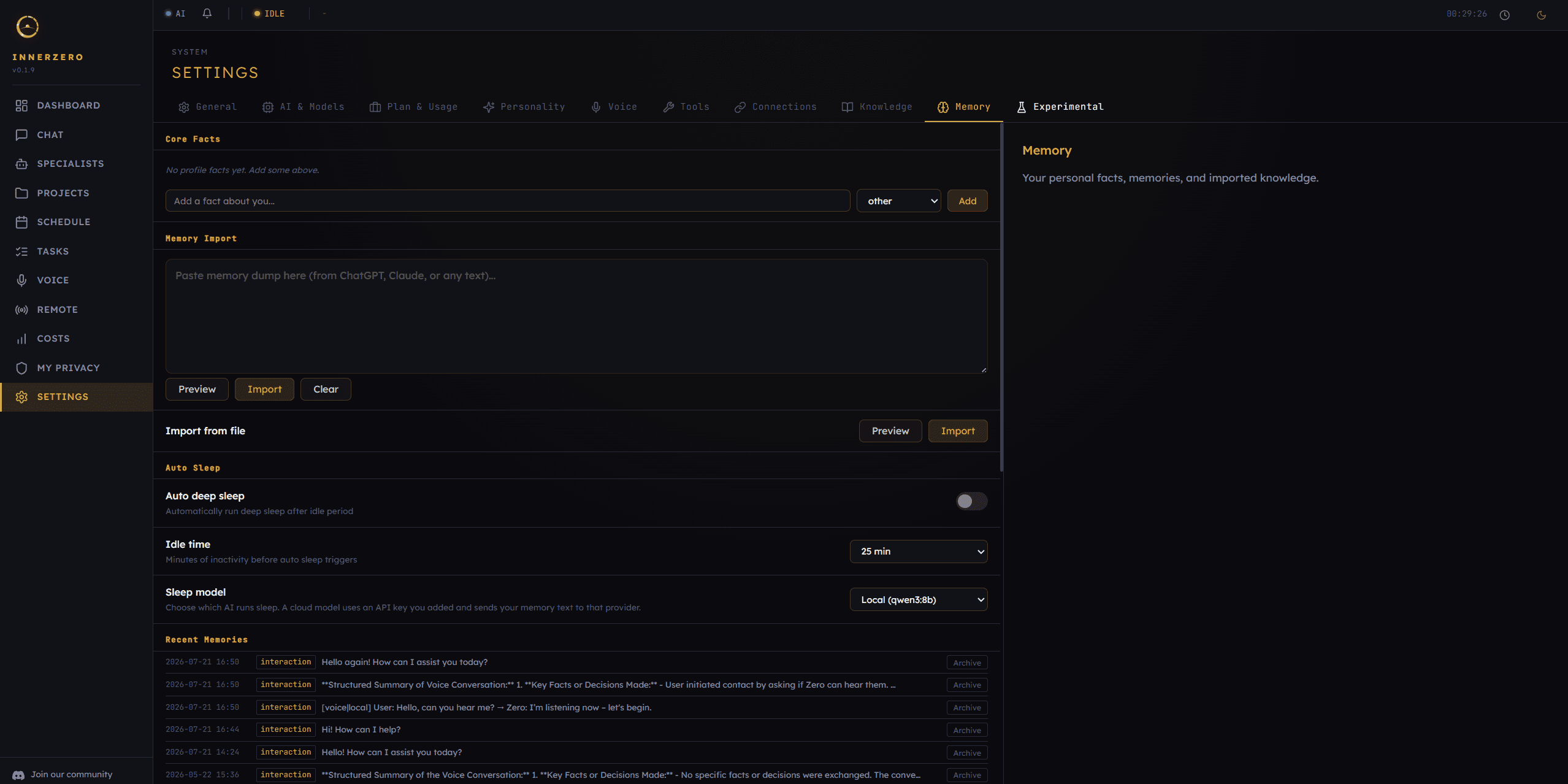
Memory settings. Core facts, imports, sleep processing, and your recent memories with an Archive button on each one.
What is included
Memory that carries across sessions
Everything InnerZero learns goes into a database file inside its own data folder on your drive. The memory is not tied to any account and the store is never synced to a server, so it is available with the app offline and stays on your own disk. When you send a message, the app pulls back the memories most related to what you asked and puts them in front of the model, leaving out anything you have archived.
Core facts the assistant always has
Retrieval is good at finding the right memory for the right question, but some things should never depend on a search hitting. Core Facts is a short list you write yourself in Settings, filed under identity, contact, work, preference, or other, and the app describes it exactly: personal facts that are always included in every message, with no retrieval needed. Put your name, your timezone, and how you want answers written here, and leave the rest to normal memory.
Sleep cycles that tidy memory while you are away
Turn on Auto deep sleep and pick an idle time between 15 and 60 minutes, and InnerZero runs a background pass once you stop working. A deep cycle promotes staged candidate memories into real ones, consolidates strategies, adjusts how strongly each memory scores, distils facts out of long conversations and uploaded documents, prunes near-duplicates, checks stored facts, and archives raw Gmail rows once they are old enough that the facts drawn from them are what matter. The status bar's sleep menu runs either one on demand, Nap for the quick cleanup or Deep Sleep for the full cycle; /sleep in chat and the privacy page's Run Sleep Cycle button both start a nap.
Sleep runs on your machine unless you choose otherwise
The default sleep model is your local AI, so the whole consolidation pass happens on device. If you would rather use a cloud provider you already hold a key for, it appears in the sleep model list, and the app makes you read what that means first: sleep will send your memory text, including your uploaded documents, to that provider, it turns off the privacy blacklist for sleep so your private words go unmasked, and sleep does not run while you are offline. It is a one-time consent you can decline and still use everything else.
Bring memory over from another assistant
If you have years of context sitting in ChatGPT or Claude, you do not have to retype it. Paste an export or any block of text into the Memory Import box, or point the file importer at a .txt or .md file, and InnerZero reads it in chunks and pulls out individual facts. Preview runs the whole extraction and shows you what it found, one line at a time with its type and which project it would land in, without storing anything. Import is the separate button you press once you are happy.
Work and personal memory kept apart
Projects give memory a filing system. With a project active, retrieval, duplicate detection, and the sleep pruning pass all stay inside that project, and the only outside memories they draw on are the unscoped ones you never filed anywhere, never another project's. That means client A's codenames cannot surface while you are working on client B. It is an organisational boundary rather than a security one: anyone using your machine can switch projects.
Every memory records where it came from
Memories carry a source tag, so the app knows whether something arrived from chat, voice, a document you uploaded, Gmail, your calendar, a connector, a specialist agent, or a slash command. When a memory is fed back into a prompt the tag is rewritten into something generic, so the model sees "(from your Gmail)" or "(from document)" and never the account address or the filename. Facts distilled during a sleep cycle inherit the source of the memory they came from, so the trail does not break.
Browse your recent memories, archive, or delete for good
Settings shows your recent memories with an Archive button on each row, and an Archived list underneath it where Restore and permanent delete sit side by side. Archiving is reversible, hiding the memory from retrieval and from every sleep pass without destroying it, and permanent delete is deliberately offered only on things you already archived. From chat, /memory searches the store and /recall lists what went in most recently.
A one-time upgrade for memory in other languages
Memory search compares meaning rather than matching words, and the model that does that comparison was originally an English-first one. The Memory tab offers a one-time upgrade that re-processes your existing memories so search and duplicate detection work across all 26 interface languages. It writes a safety backup before it changes anything, reports how many memories are left to go, and is resumable, so you can cancel it and pick it up later.
Step-by-step guides
Walkthroughs for setting this up and getting the most from it.
AI That Remembers Your Conversations: How Local Memory Works
What persistent memory changes in daily use, and why keeping it local raises what you are willing to share.
Why Your AI Should Remember You
The case for an assistant that accumulates context instead of resetting every conversation.
Keeping Work and Personal AI Memory Separate With Project Scoping
How to split memory into projects, when to create a new one, and what the boundary does not cover.
Best Private AI Assistant With Memory: Local-First, Encrypted at Rest
The honest rundown of where memory is stored and what protects it at rest on your own disk.
Frequently asked questions
Where is my AI assistant's memory stored?
In a database file inside InnerZero's own data folder on your machine. The memory is not tied to any account and the store is never synced to a server, so it is available with the app offline and is only reachable by someone using your computer.
Can I see and delete what InnerZero remembers about me?
Yes. Settings shows your recent memories with an Archive button on each one, and an Archived list where you can restore a memory or delete it for good. Archiving is reversible and hides the memory from retrieval and from sleep processing. Permanent delete is offered only on memories you have already archived, so nothing is destroyed in one click.
Does memory processing send my data to a cloud provider?
Not by default. Sleep processing runs on your local AI unless you deliberately pick a cloud model you already hold an API key for. If you do pick one, InnerZero states before you accept that sleep will send your memory text, including your uploaded documents, to that provider, and that it turns off the privacy blacklist for sleep.
Can I keep work memory separate from personal memory?
Yes, using projects. With a project active, memory retrieval, duplicate detection, and the sleep pruning pass stay inside that project and only draw on unscoped memories alongside it, never another project's. It is an organisational boundary rather than a security one, since anyone at your machine can switch projects.
Can I import my memory from ChatGPT or Claude?
Yes. Paste an export or any block of text into the Memory Import box in Settings, or import a .txt or .md file from your computer. Preview runs the extraction and shows the facts it found without storing them, so you can check the result before you commit to the import.
How does InnerZero decide which memories to use?
It compares your message against the stored memories and pulls back the closest matches, then adds your core facts, which are included in every message without any search. Anything you have archived is left out of that lookup, so it stays in the store without shaping answers.
Explore more
- AI ChatStreaming local chat with slash commands, attachments, and export to real documents.
- Knowledge PacksOffline Wikipedia your assistant can check its answers against. 871,000 articles, no connection.
- Tools45 built-in tools for search, files, calendar and time. Each one switches off on its own.
- All features