
Web research and job applications, with your approval at every step
The usual auto-apply tool wants three things: an account on its servers rather than yours, your browser session so it can act as you, and the freedom to send applications you never read. That last one is the problem: by the time you see what went out, it has already gone.
The Action Hub inverts all three. It runs from your machine on your own Apify key, the apply browser is a brand-new session that has never seen your logins, and it stops and asks before it submits anything. It sits as a tab next to Tasks and does nothing at all until you connect an account or install the automation yourself.
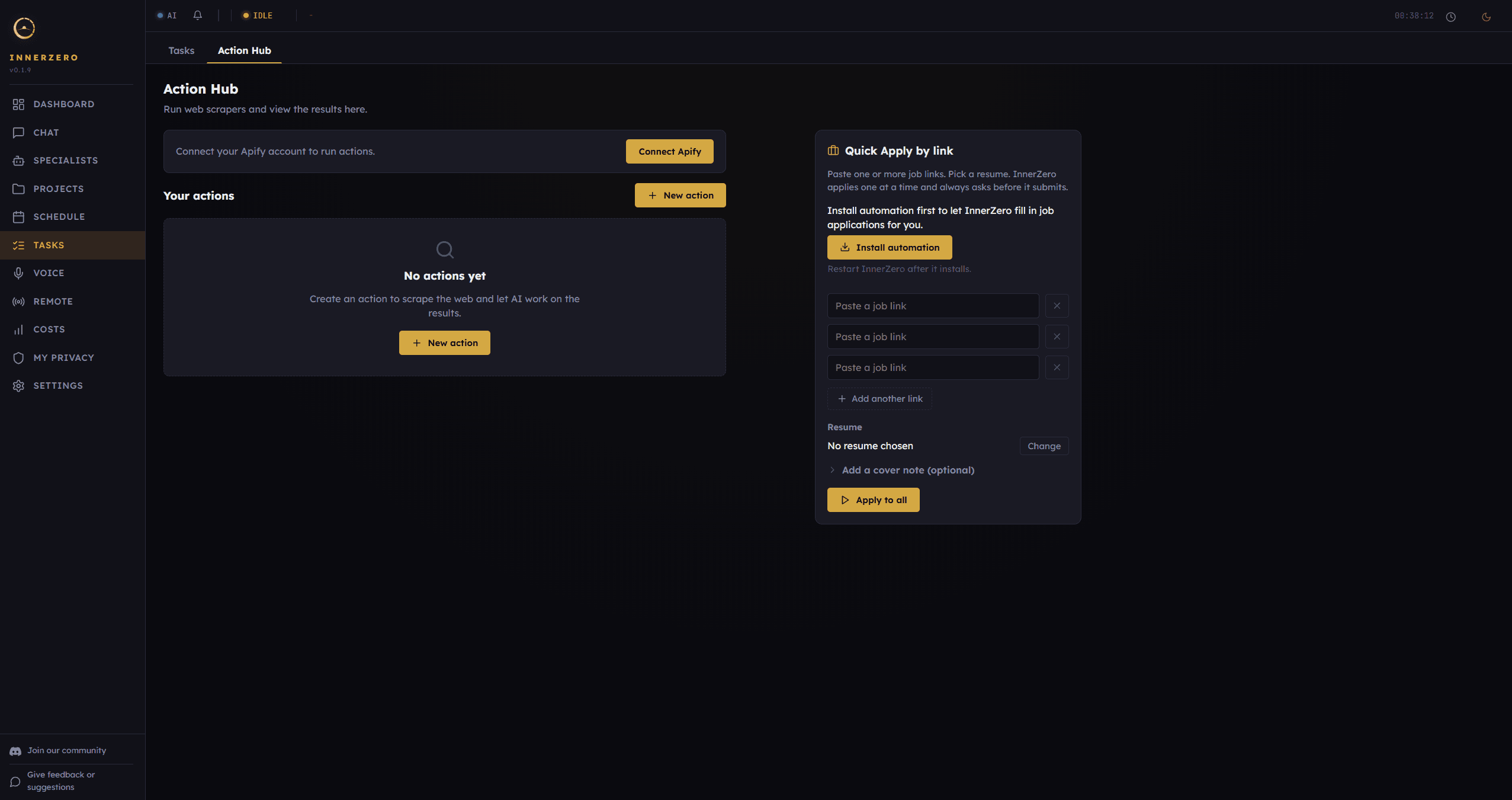
The Action Hub. It uses your own API key, runs in the background, and asks before it submits anything.
What is included
Web research on your own Apify key
The research half runs Apify Actors, which are hosted web scrapers, on your own Apify account. The built-in list covers Indeed jobs, LinkedIn jobs, Google Places, general website content, and business leads, and each run is billed to your own Apify account rather than to us. Your token is stored encrypted on your machine and travels only as an authorisation header, never in a web address and never in a log. Only the run parameters and that token reach Apify; your memory database, your files, and your profile stay where they are.
Results you can actually read
A finished run renders as a real table rather than a JSON dump. You can sort it, filter across all columns or just one, hide columns you do not care about, and expand any row to see every field in full. Web addresses render as links that open in your normal browser instead of inside the app. The whole table can be copied, or downloaded as JSON or CSV.
Save an action, re-run it, or schedule it
A saved action bundles the scraper, the search inputs, what you want the AI to do with the results, the submit setting, and a cadence, so you set it up once. Cadence is Run now, Daily, or Weekly. Every run is written to its own folder in your user data with the results as both JSON and CSV, so the history survives a restart and you can open the files directly. A combined view merges every past run for that action into a single table.
Quick Apply by link
The Quick Apply panel takes up to ten job links at a time, one per box, with a resume picker and an optional cover note. InnerZero works through the list on a single background worker, one application at a time, so there is never a second browser running behind your back. Each link shows its own status as it moves through waiting, working, draft ready, needs you, or done. The apply flow is Windows only in this release. InnerZero itself runs on Windows, macOS and Linux, but the apply automation cannot be installed on macOS or Linux yet.
A resume library, not one fixed profile
You can keep more than one resume and mark which one is in use. Add a resume by uploading a CV, or by picking a document you already uploaded in a past chat; that picker covers PDF, Word, plain text, and Markdown. InnerZero reads the file and pulls it into structured fields covering contact details, headline, desired role, skills, summary, experience, education, work authorisation, and availability, then saves it and sets it as the one in use, so switching back to another resume or deleting this one happens from the same panel. Reading the CV into those fields uses whichever AI you have InnerZero set to, so in Private or Offline mode that is the local model and the text never leaves your machine. The profile is used only when you run an action and is not added to normal chat memory.
Nothing is submitted without your approval
There are exactly two submit settings: ask before submitting, or fill it in only and never submit. There is no auto-submit option in the interface, and the store that holds saved actions rejects one outright, so it cannot be reintroduced by editing an action later. Under the ask setting the browser fills the form, then stops and waits while an Approve or Dismiss card appears in InnerZero. If you dismiss it, or do nothing, the application is not sent.
Scheduled runs always stop at a draft
A scheduled run is unattended, so it is forced to draft by the app itself no matter what the saved action says. That override is not a setting you can turn off, which is the point: a cadence you set weeks ago cannot quietly start submitting on your behalf. A scheduled apply will also only fill in forms on sites you have added to that action's approved-sites list, and it leaves everything else for you to look at.
A fresh browser that never sees your logins
The apply flow drives its own Chromium, downloaded on demand when you press Install automation and checked against a pinned checksum before it is used. Each run opens a brand-new browser context with no saved profile, no stored session, and no cookies, so it can never act as you on a site you are already signed in to. A separate guard checks every navigation and every redirect against a default-deny list, so anything that is not the job site you gave it is blocked and reported back rather than followed, and loopback and private-network addresses are refused outright. Each navigation records the destination host only, never a form value and never anything from your profile.
Step-by-step guides
Walkthroughs for setting this up and getting the most from it.
Frequently asked questions
Do I need my own Apify account to use the Action Hub?
Yes, for the web research half. The Action Hub runs scrapers on your own Apify account using a personal API token that you paste in once, and each run uses your Apify credits. The token is stored encrypted on your machine. The job application half does not use Apify at all, so you can use that side without connecting an Apify account.
Will InnerZero submit a job application without asking me?
No. An action can only be set to ask before submitting or to fill the form in and never submit, and there is no auto-submit setting anywhere in the app. Under the ask setting the browser stops at the finished form and waits for you to press Approve. Scheduled runs are forced to draft regardless of the saved setting, so an unattended run can never submit.
Does the apply browser use my saved logins or cookies?
No. Every apply run opens a brand-new browser context with no saved profile, no stored session, and no cookies, so it cannot reuse a site you are already signed in to. It also runs in a separate Chromium that InnerZero downloads for this purpose, not in your everyday browser.
Which operating systems does the apply flow work on?
The apply flow is Windows only in this release. InnerZero itself runs on Windows, macOS and Linux, but the apply automation cannot be installed on macOS or Linux yet. Where it cannot run, the Action Hub refuses to start rather than failing partway through. The web research half is separate and does not need the apply automation installed.
Is the Action Hub on by default?
No. It appears as a tab next to Tasks, but it does nothing until you connect an Apify account for research or press Install automation for job applications. Both are explicit one-time steps, and the automation download only happens when you press that button. InnerZero needs a restart once the download finishes.
How many job links can I apply to at once?
Up to ten per run. InnerZero works through them one at a time on a single background worker, so only one application is ever in flight, and each link shows its own status in the panel. You can stop the run at any point, and the links that had not started are marked as stopped.
Explore more
- Tools45 built-in tools for search, files, calendar and time. Each one switches off on its own.
- SpecialistsDedicated agents built for one job, with approval gates before the Coding Specialist changes a file.
- Screen AutomationReads the screen and clicks, types, and scrolls for you. Off until you turn it on.
- All features