
How to Use a Private AI Assistant in Your Own Language
InnerZero runs locally in 26 languages. How to switch the whole interface and the AI replies to your language, with right-to-left support, fully offline.
Most AI assistants assume you speak English. If your first language is Spanish, Arabic, Hindi, or Japanese, you either translate in your head or put up with menus you half understand. InnerZero takes a different approach. The whole app, and the AI's replies, run in the language you choose, and all of it stays on your machine.
Quick summary
- InnerZero's interface and the assistant's replies are available in 26 languages.
- You pick your language in Settings and the whole app changes straight away, with no restart.
- Right-to-left layout is built in for Arabic, Hebrew, Persian, and Urdu.
- Everything runs locally, so your language choice and your conversations never leave your computer.
Can a local AI assistant work in my language?
Yes. InnerZero's interface and the assistant's responses are available in 26 languages, and you switch between them in Settings. This is not a browser translation layer bolted on top. Every menu, button, label, and the AI's own replies are produced in the language you select.
Because InnerZero runs on your own hardware through a local model backend like Ollama, the language you pick is a local preference. It is never sent to a server, and neither are your conversations. You get an assistant that works in your language and keeps your data on your machine at the same time.
Which languages does InnerZero support?
InnerZero ships with 26 interface languages as of the current version. The set covers most of the widely spoken languages on desktop:
| Region | Languages |
|---|---|
| Western Europe | English (US and UK), French, Spanish, German, Italian, Portuguese, Portuguese (Brazil), Dutch, Swedish |
| Eastern Europe | Polish, Russian, Ukrainian |
| Middle East | Arabic, Hebrew, Persian |
| South and Southeast Asia | Hindi, Urdu, Vietnamese, Thai, Indonesian |
| East Asia | Chinese (Simplified), Chinese (Traditional), Japanese, Korean |
| Other | Turkish |
If your language is on that list, the entire app speaks it, and more languages are added over time.
How do I change the language?
Open Settings > General and find the Interface Language row. It is a searchable dropdown, so you can type the start of your language and pick it from the list. Each option shows the native name next to the English name.
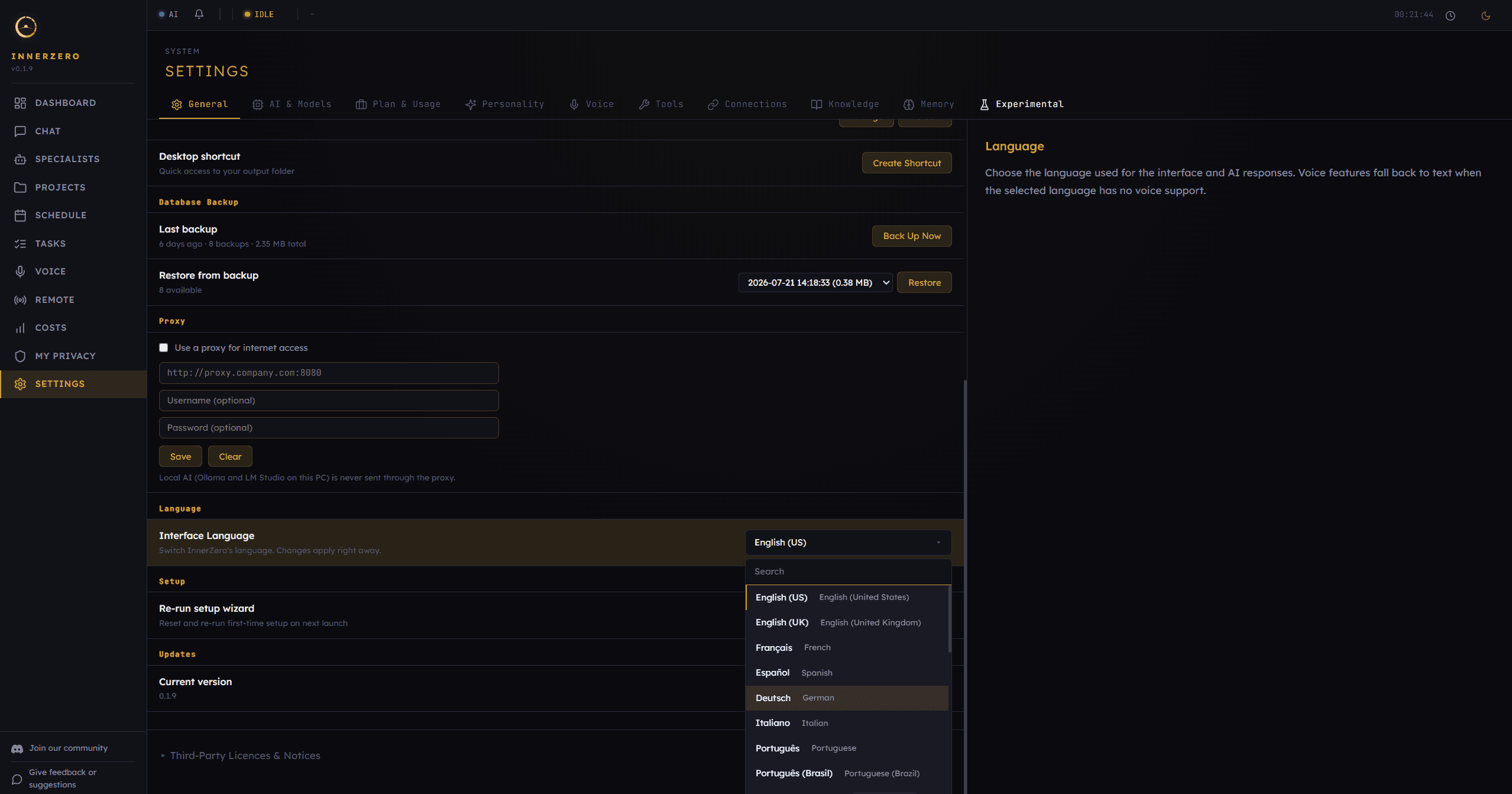
The change applies straight away. You do not restart the app. The menus re-render in your language, and the next thing the assistant says comes back in that language too.
Does the AI reply in my language, or just the menus?
Both. This is the part most translated apps get wrong. When you choose a language, InnerZero tells the assistant to respond in it, so your actual conversations happen in your language, not only the surrounding buttons. If an earlier part of a chat drifted back to English, switching language pulls the replies back into line.
English stays the default until you change it, and the English experience is unchanged. Everything else is opt-in.
Is it a proper translation or rough machine output?
The interface is properly translated, not run through a quick auto-translator at load time. Menus, settings, and messages are written out for each language. The assistant's replies are a separate thing again: the local model generates them natively in your language rather than writing in English and translating afterwards, so the responses read like the language rather than like a translation of it.
Quality varies a little by language, as it does with any model, but the common European and Asian languages are well covered. If you spot a label that reads oddly in your language, it is a fixable string, not a limit of the approach.
Does right-to-left layout work properly?
Yes. Arabic, Hebrew, Persian, and Urdu render with a full right-to-left layout, not translated text crammed into a left-to-right design. Text alignment, the flow of the interface, and reading direction follow the Unicode bidirectional algorithm so the app reads naturally.
Right-to-left support is easy to skip and hard to retrofit, which is why a lot of desktop AI tools never add it. It is built in here.
Why does running in your language locally matter?
A cloud assistant that supports your language still sends your words to a company server to read and process them. For a lot of people, the language they think in is also the language they are most personal in: notes to family, health questions, money worries, work they cannot share. Keeping that on your own machine matters more, not less, when it is in your mother tongue.
InnerZero processes your conversations with a local model on your hardware. The language you choose changes what you read and what the assistant says, but it never changes where the work happens. There is no server in the loop. If you want the background on this model in general, see what is a local AI assistant.
Does multi-language work offline?
Yes. Like the rest of InnerZero, the language system is local. Once your model is installed, you can switch languages and hold entire conversations with no internet connection. Your language preference is stored on your machine, and your chats are processed by the local model.
There is also a one-time memory upgrade that makes your saved memories searchable across every language you use, so the assistant can still recall what you told it in one language when you ask about it in another. For how the app behaves with no connection, see how to use AI offline.
What about voice in other languages?
Voice follows the same idea. Where a language has built-in voice support, you can speak and listen in it. Where it does not yet, the app falls back to text so nothing breaks. You can read more about how the local voice system works in voice mode explained.
Frequently asked questions
How many languages does InnerZero support?
InnerZero supports 26 interface languages as of the current version, covering English, French, Spanish, German, Italian, Portuguese, Dutch, Polish, Russian, Ukrainian, Chinese (Simplified and Traditional), Japanese, Korean, Arabic, Hebrew, Hindi, Turkish, Vietnamese, Thai, Swedish, Indonesian, Persian, and Urdu. More are added over time.
Is my language choice sent to a server?
No. InnerZero runs locally, and your language preference is stored on your own machine. Neither your language choice nor your conversations are uploaded.
Can I switch languages in the middle of a conversation?
Yes. You can change the language at any time in Settings. It applies immediately, and the assistant's replies follow the new language from that point.
Does the AI actually respond in my language, or only the menus?
Both. The interface and the assistant's replies are in your chosen language. It is not only a translation of the buttons.
Is multi-language support free?
Yes. All 26 languages are part of the free InnerZero download. There is no separate purchase for language support.
The point
An AI assistant should meet you in your language, not force you into someone else's. InnerZero runs in 26 languages, replies in the one you pick, supports right-to-left scripts, and does all of it on your own hardware with nothing sent away. Pick your language and start talking. Download InnerZero to try it.
Written by
Louie SummersFounder
Louie Summers is the founder of Summers Solutions Ltd and the sole developer of InnerZero, based in Birmingham, UK. Every post here is written by the person who builds the product.
The feature this guide covers
Related Posts
Asking AI About Health Questions Without the Privacy Cost
Health questions are some of the most personal things people type into AI. InnerZero runs locally, so you can ask without sending your symptoms to a server. What it can help with, and what it can't.
2026-09-04
Can a Private AI Read Text From Your Screenshots and Images?
InnerZero can read the text out of a screenshot or photo on your own machine, with the image itself never leaving your computer. How local image text extraction works and why it stays private.
2026-08-07
AI That Remembers Your Conversations: How Local Memory Works
Most AI assistants forget you after every chat. How persistent memory works, why cloud memory has limits, and how InnerZero stores it all locally.
2026-04-13