
How Much VRAM Do You Need for Local AI? A 2026 Guide
A clear guide to how much VRAM local AI models need, with an approximate table by model size, the quantization maths behind it, and what to do if you have no dedicated GPU.
"How much VRAM do I need?" is the first question almost everyone asks before running AI on their own computer. This guide gives you a clear answer with an approximate table by model size, explains the simple maths behind the numbers so you can work out any model yourself, and covers what to do if you do not have a dedicated graphics card.
Quick summary
- VRAM is the memory on your graphics card, and it is the main limit on which local AI models you can run.
- As a rule of thumb at 4-bit quantization, a model needs roughly half a gigabyte of VRAM per billion parameters, plus headroom for context.
- An 8 billion parameter model runs comfortably on 6 to 8 GB of VRAM. A 70 billion parameter model needs around 48 GB or multiple cards.
- You can run smaller models on the CPU with no dedicated GPU at all, just more slowly.
How much VRAM do you need for local AI?
For most people, 8 GB of VRAM is the comfortable starting point, and 12 to 16 GB covers the popular mid-size models with room to spare. VRAM is the dedicated memory on your graphics card, and the whole model has to fit in it (alongside some working space) to run at full speed.
The exact figure depends on two things: how big the model is, measured in billions of parameters, and how heavily it is compressed, known as quantization. Get those two numbers and you can estimate the VRAM for any model. For a wider view of local AI hardware, see hardware for local AI.
How is VRAM usage calculated for local models?
The size of a model in memory comes from its parameter count multiplied by the number of bytes used to store each parameter. Full precision uses about 2 bytes per parameter, but local tools almost always run quantized models, which compress each parameter to roughly 4 bits, or half a byte.
At 4-bit quantization the maths is simple: about 0.5 GB of memory per billion parameters for the weights, then add 1 to 2 GB of headroom for the context window and working space. So an 8 billion parameter model is roughly 4 GB of weights plus headroom, which is why it fits on an 8 GB card. The Ollama model library lists the real download size of each model, and Hugging Face model cards show parameter counts, so you can check any specific model against this rule.
What are the VRAM requirements by model size?
The table below gives approximate figures for 4-bit quantized models. Treat these as guidelines, not exact numbers, because context length and the specific quantization level shift them up or down.
| Model size | Approx 4-bit size | Recommended VRAM | Runs on CPU only? |
|---|---|---|---|
| 1 to 2 billion | About 1 GB | 2 to 4 GB or none | Yes, easily |
| 3 to 4 billion | About 2 to 3 GB | 4 to 6 GB | Yes, usable |
| 7 to 8 billion | About 4 to 5 GB | 6 to 8 GB | Yes, slower |
| 12 to 14 billion | About 8 to 9 GB | 10 to 12 GB | Possible, slow |
| 27 to 32 billion | About 18 to 20 GB | 24 GB | Hard, very slow |
| 70 billion | About 40 GB | 48 GB or multi-GPU | Not practical |
Popular model families map onto this directly. A Gemma3 4B or Llama 3 8B suits an entry card, a Qwen3 14B wants a mid-range card, and the larger Qwen3 and Gemma3 sizes or a 70B Llama need high-end hardware. For which models InnerZero runs, see what models does InnerZero use.
Can you run local AI without a dedicated GPU?
Yes. Models can run on your CPU using ordinary system RAM instead of VRAM, which means any modern computer can run smaller local models without a graphics card at all. The trade-off is speed: CPU inference is slower, so a model that feels instant on a GPU may produce a few words per second on a CPU.
The practical approach with no GPU is to stick to models in the 1 to 8 billion parameter range and make sure you have enough system RAM, ideally 16 GB or more. Apple Silicon Macs are a special case, because their unified memory lets the chip use system RAM as fast graphics memory, so they punch above their weight for local AI. For a full setup walkthrough, see run AI on your PC.
What hardware does InnerZero recommend?
InnerZero is designed to work across a wide range of machines, because it runs the same open models as the rest of the local AI field through engines like Ollama. The sensible targets are straightforward.
- Entry level: any modern laptop or desktop with 16 GB of system RAM runs small models on the CPU.
- Comfortable: a graphics card with 8 GB of VRAM, such as a mid-range NVIDIA card, runs 7 to 8 billion parameter models smoothly.
- Enthusiast: 16 to 24 GB of VRAM runs the mid and larger model sizes well.
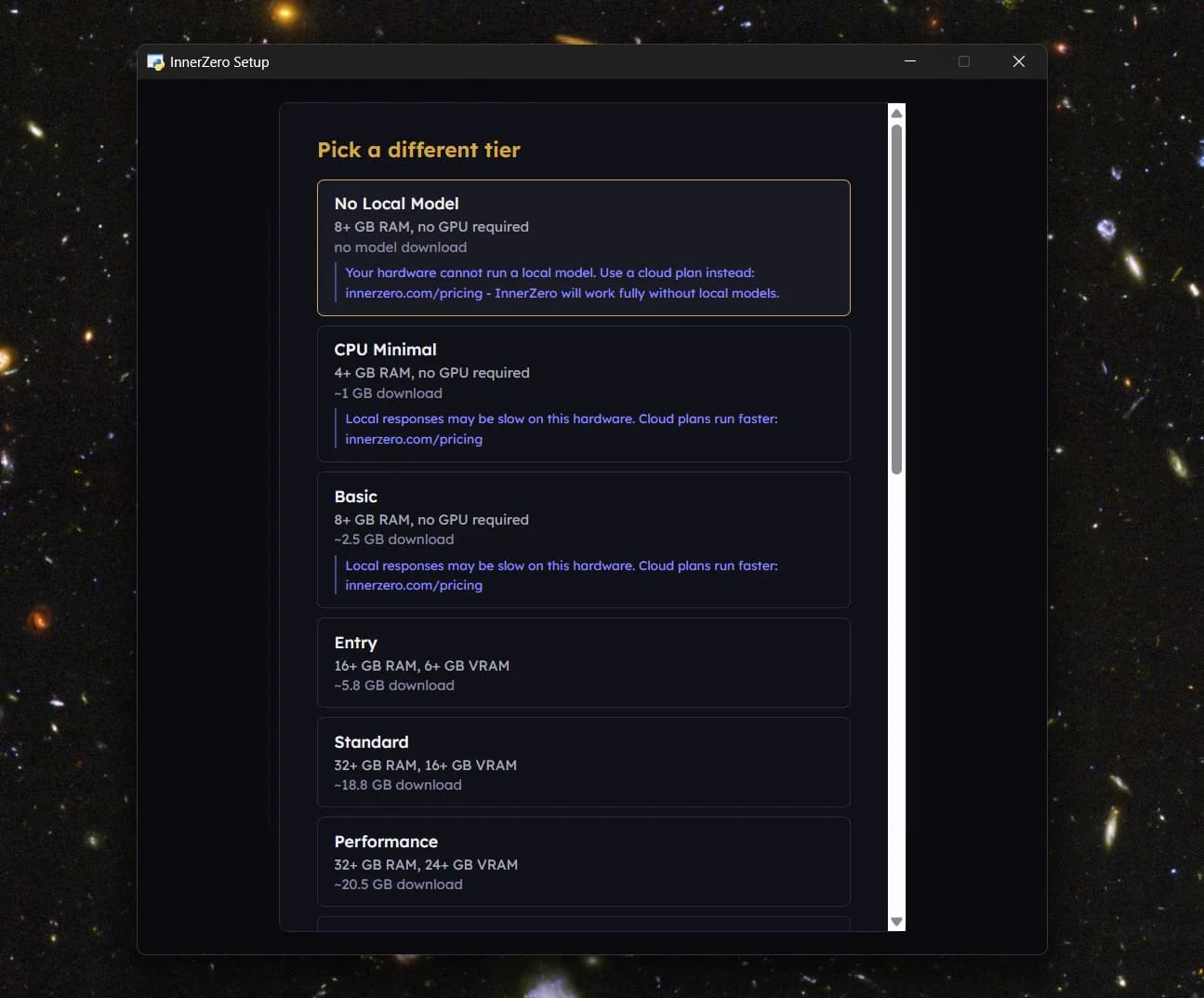
InnerZero sets the model up automatically based on your hardware, so you do not have to pick quantization settings by hand. To compare it with other local tools, see local AI assistants compared. For the top end of local hardware, see frontier tier hardware for local AI.
Frequently asked questions
How much VRAM do I need to run local AI?
For most people 8 GB of VRAM is the comfortable starting point, which runs popular 7 to 8 billion parameter models well. Smaller models run on 4 GB or even on the CPU with no graphics card, while the largest 70 billion parameter models need around 48 GB or multiple cards.
How do I calculate VRAM for a specific model?
At 4-bit quantization, allow about 0.5 GB of VRAM per billion parameters for the model weights, then add 1 to 2 GB for context and working space. So a 14 billion parameter model needs roughly 7 GB of weights plus headroom, which fits on a 10 to 12 GB card.
Can I run local AI without a graphics card?
Yes. Models can run on your CPU using system RAM instead of VRAM, so any modern computer can run smaller models. It is slower than a GPU, so stick to models in the 1 to 8 billion parameter range and aim for 16 GB or more of system RAM.
Does more VRAM make local AI faster?
More VRAM mainly lets you run larger models and longer context, rather than speeding up a model that already fits. Once a model fits comfortably in VRAM, raw speed comes from the GPU's processing power and memory bandwidth, not from spare capacity.
What is quantization and why does it matter for VRAM?
Quantization compresses a model so each parameter takes fewer bits, commonly about 4 bits instead of 16. This cuts the memory needed by roughly three quarters with only a small quality cost, which is why a model that would need tens of gigabytes at full precision can run on a consumer card.
Get started
Download InnerZero for free on Windows, macOS, and Linux. It checks your hardware and sets up a suitable model automatically, so you do not have to work out the VRAM maths yourself.
Written by
Louie SummersFounder
Louie Summers is the founder of Summers Solutions Ltd and the sole developer of InnerZero, based in Birmingham, UK. Every post here is written by the person who builds the product.
The feature this guide covers
Related Posts
What's The Initial Model Download Size and VRAM Impact of Running AI?
How big is the first AI model download, and what does it cost in VRAM once loaded? Approximate size bands by parameter count and quantisation level.
2026-09-03
Frontier Tier Hardware for Local AI: When Does It Make Sense?
256 GB RAM, 120 GB VRAM, workstation-class hardware for local AI. Who actually needs this tier, what it costs, and when it's worth the investment.
2026-06-16
The Hidden Costs of Running AI on Your Own PC (That Nobody Warns You About)
Local AI is free to run, but not free of tradeoffs. Disk usage, GPU thermals, model-version drift, and the other costs people discover the hard way.
2026-05-26