
What Hardware Do You Need to Run AI Locally?
A clear breakdown of the RAM, GPU, CPU, and disk space you need to run a private AI assistant on your own PC.
This is the first question everyone asks. Can my PC run local AI? The short answer: probably yes, if it was made in the last five years. The longer answer depends on how fast you want it to be.
How much RAM do I need for local AI?
AI models need to fit in memory. The models that run locally are compressed versions of the same architectures used by cloud services. They're smaller, but they still need room.
With 16 GB of RAM, you can run capable models comfortably. The AI will work, respond well, and handle everyday tasks. With 32 GB, you get access to larger models that are smarter and more capable. Above 32 GB gives you headroom for the biggest open-source models available.
If your PC has 8 GB of RAM, local AI will struggle. It's technically possible but not a good experience.
What GPU do I need for local AI?
The GPU is the single biggest factor in how fast your AI responds. Specifically, the amount of VRAM (video memory) on the card. More VRAM means larger, more capable models. Clock speed matters less than memory.
6 GB VRAM (entry level). Cards like the RTX 3060 or GTX 1660 Super. Runs smaller models well. Responses in 2 to 5 seconds. Good enough for everyday use.
10 to 16 GB VRAM (standard). Cards like the RTX 3080, RTX 4070, or RTX 4070 Ti. This is the sweet spot. Runs mid-size models with fast response times. Most people will be happy here.
24 GB+ VRAM (performance). Cards like the RTX 4090 or professional cards like the A6000. Runs the largest consumer models at excellent speeds. Feels as fast as cloud AI.
No GPU (CPU only). It works. InnerZero supports CPU-only mode. But responses take longer, maybe 10 to 30 seconds depending on the question. Fine for casual use, not ideal for extended conversations.
InnerZero runs best on NVIDIA GPUs through CUDA. AMD and Intel GPUs are supported on an opt-in basis through Vulkan, and Apple Silicon Macs use Metal. The NVIDIA path is the most mature.
What CPU is enough for local AI?
Any modern Intel or AMD processor from the last 5 to 7 years will work. The AI doesn't lean heavily on the CPU when a GPU is available. AVX2 instruction support helps: almost every x86 processor since 2015 has it, and local models run noticeably faster with it. It is not a hard requirement though. A chip without it still runs local models, just more slowly, and Apple Silicon has no AVX2 at all yet runs InnerZero fine.
Core count matters less than you'd think for AI inference. A modern quad-core is fine.
How much disk space do I need?
AI models need to be downloaded once and stored on disk. A basic model is about 2 to 5 GB. A mid-range model is 5 to 18 GB. InnerZero itself is around 280 MB.
Plan for at least 10 GB of free space. 30 GB gives you room for multiple models and offline knowledge packs.
How does InnerZero pick a model for my hardware?
When you install InnerZero, it scans your hardware and assigns a tier automatically. You don't need to pick models or configure anything.
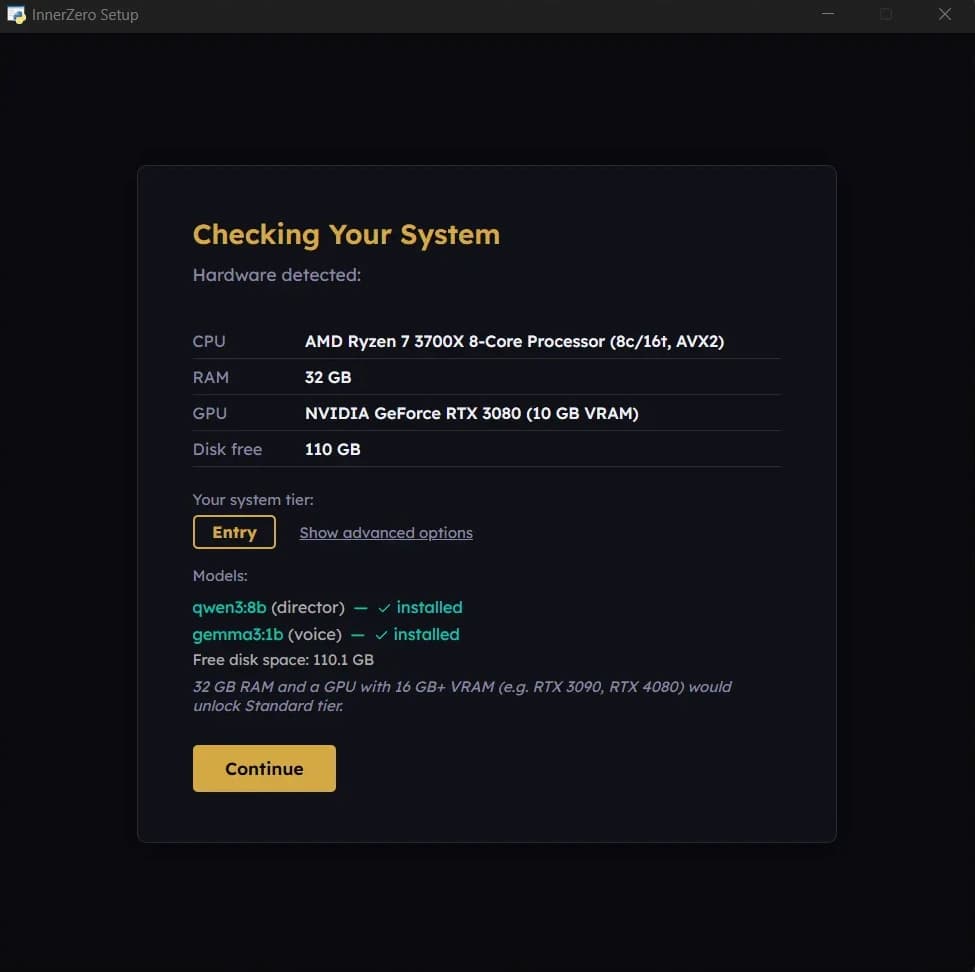
Here's what the tiers look like:
CPU-only tiers (4 GB RAM and up, no GPU needed). Four of them, from the smallest model on 4 to 7 GB of RAM up to a 14b model on 32 GB. They work, just slower, and local voice is not available without a GPU.
Entry (16+ GB RAM, 8 to 16 GB VRAM). Budget GPU tier, and the first tier with local voice. Good performance with compact models.
Standard (32+ GB RAM, 16 to 24 GB VRAM). The recommended experience. Fast, capable, smooth.
Performance (32+ GB RAM, 24 to 48 GB VRAM). Premium tier, fast responses on large models. Pro, Enterprise, and Frontier tiers sit above it for workstation and server hardware.
InnerZero picks the best model for your hardware, downloads it during setup, and optimises the settings. If you upgrade your GPU later, re-run the setup wizard and it'll detect the new hardware.
The bottom line
If you have a gaming PC or a workstation from the last few years, you can almost certainly run local AI. The experience scales with your hardware. Better GPU means faster and smarter responses, but even modest hardware gives you a functional private AI assistant.
Ready to find out? Download InnerZero and let the setup wizard tell you exactly what your PC can handle. For a full setup walkthrough, check out our guide on how to run AI on your PC.
Written by
Louie SummersFounder
Louie Summers is the founder of Summers Solutions Ltd and the sole developer of InnerZero, based in Birmingham, UK. Every post here is written by the person who builds the product.
The feature this guide covers
Related Posts
How to Run a Local AI Without a GPU
You can run a local AI without a GPU. Which small models work on CPU and RAM, realistic speed expectations, and how InnerZero picks a model for your machine.
2026-09-29
How to Run Llama 3 Locally on Your PC
Run Llama 3 locally on your PC with Ollama or LM Studio, then add memory and voice with InnerZero. Pick a size and quant, check hardware, keep it private.
2026-09-18
The Best Free AI Assistant for Students Who Work Offline
Cloud AI subscriptions cost money students do not have, and university wifi is unreliable. InnerZero is free, runs offline once installed, and needs no account. Here is how it fits a student workflow.
2026-07-10