
How to Give Your AI Offline Access to Wikipedia
Download Wikipedia and reference data for your local AI assistant. Fully offline knowledge retrieval with no internet required.
AI models are good at generating text that sounds right. But sometimes they make things up. They'll confidently tell you a wrong date, a wrong number, or a wrong name. This is called hallucination, and it's one of the biggest problems with AI.
InnerZero has a feature that helps: knowledge packs. They're offline Wikipedia databases that give the AI real facts to reference.
What are knowledge packs?
A knowledge pack is a local database containing articles from Wikipedia. When you ask InnerZero a factual question, it searches the knowledge pack first, finds relevant articles, and includes that information in its response.
Instead of generating an answer purely from its training data (which might be wrong), the AI can reference actual encyclopedia articles stored on your hard drive.
Which knowledge packs are available?
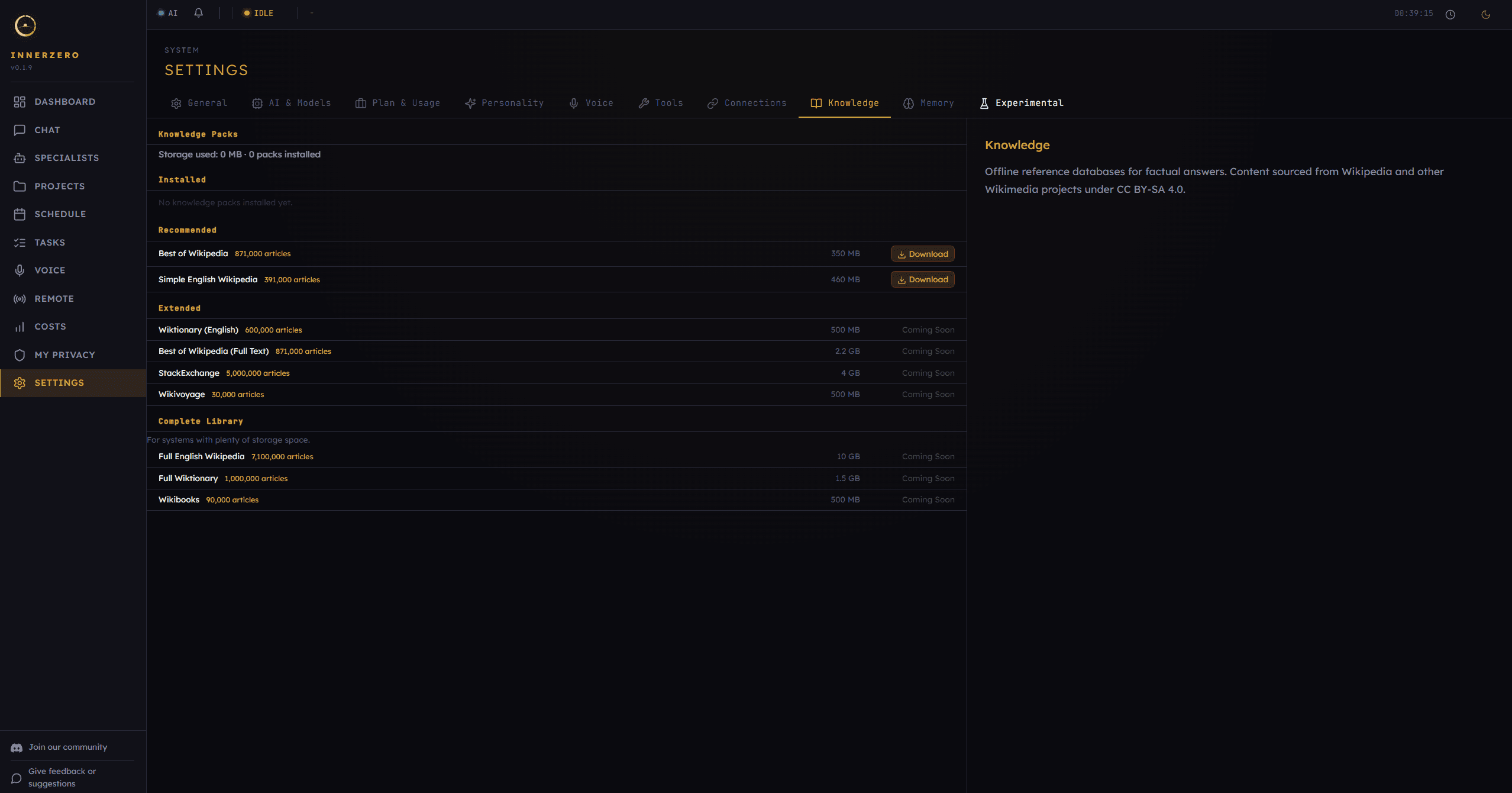
InnerZero currently offers two knowledge packs:
Best of Wikipedia. About 871,000 articles covering the most important and most-viewed Wikipedia topics. Science, history, geography, notable people, countries, cities, and major events. Around 350 MB to download.
Simple English Wikipedia. About 391,000 articles written in simplified English. Broader coverage but shorter articles. Good for quick factual lookups. Around 460 MB.
Both are sourced from Wikipedia and Wikimedia projects under the Creative Commons CC BY-SA 4.0 licence.
How do I install a knowledge pack?
Open InnerZero, go to Settings, then the Knowledge tab. You'll see the available packs with download buttons. Click download and wait. The packs download in the background and are indexed automatically.
Once installed, they work immediately. No restart needed. You can enable or disable individual packs, and delete them if you need the disk space back.
How do knowledge packs work in practice?
You don't need to do anything special. Just ask questions normally.
"Who wrote Frankenstein?" Zero searches the knowledge pack, finds the article about Mary Shelley and Frankenstein, and includes that context in its response. You get a factual answer backed by a real source.
"What's the population of Japan?" Same process. The AI checks the knowledge pack, finds the relevant article, and gives you numbers from an actual source rather than guessing.
The knowledge reference appears in the chat as a collapsible citation. You can expand it to see the source article title and a snippet of the content.
Why do knowledge packs matter for offline use?
Knowledge packs are especially valuable when using InnerZero offline. Without internet, the AI can't search the web for facts. But with a knowledge pack installed, it still has access to hundreds of thousands of factual articles.
This makes InnerZero genuinely useful offline. Not just for conversation, but for real factual questions. On a plane, in a remote area, or on an air-gapped machine, your AI still has a reference library.
What are the limitations of knowledge packs?
Knowledge packs are snapshots. They reflect Wikipedia as it was when the pack was generated. They won't have breaking news or very recent events.
They cover a lot of ground, but they're not the entire Wikipedia. The Best of Wikipedia pack has 871,000 articles out of millions. If you ask about a very obscure topic, the pack might not have it.
The AI still generates its response. It uses the knowledge pack as a reference, not as a script. If the article doesn't fully cover your question, the AI fills in gaps from its training data (which may or may not be accurate).
Are knowledge packs private?
Knowledge packs are stored entirely on your machine. No internet connection is needed to use them after download. No queries are sent to Wikipedia or any other server. The search happens locally against a local database.
This is consistent with InnerZero's privacy approach. Your questions about health, history, science, or anything else stay on your hardware.
Get started
Download InnerZero, go to Settings, and grab a knowledge pack. It takes a few minutes to download. Then start asking factual questions and notice the difference.
Written by
Louie SummersFounder
Louie Summers is the founder of Summers Solutions Ltd and the sole developer of InnerZero, based in Birmingham, UK. Every post here is written by the person who builds the product.
The feature this guide covers
Related Posts
Private AI for Lawyers and Legal Work
Private AI for lawyers keeps client files on your machine. How local AI helps with review, summarising, and drafting without sending docs to the cloud.
2026-10-09
Private AI for Writers and Authors
Private AI for writers keeps unpublished manuscripts on your own machine. How local AI drafts in private, remembers your characters, and exports to documents.
2026-10-06
What Is LLM Quantization? Q4, Q8, and Picking a Local Model
LLM quantization explained in plain terms: what Q4_K_M and Q8 labels mean, the size, speed, and quality tradeoffs, and how to pick a quant for your VRAM or RAM.
2026-10-02