
Can AI Help You Apply for Jobs Without Handing Over Your Data?
InnerZero's Action Hub can research roles and help fill in job applications, with your approval on every submission and your details kept on your own machine. An honest look at what it does and does not do.
Job hunting is repetitive in a way that begs for help: the same details typed into form after form, the same research across dozens of listings. Plenty of tools promise to fire off applications for you, which sounds great until you think about where your CV is going and what is being submitted in your name. InnerZero's Action Hub takes a more careful line. It can help with the research and the form filling, on your own machine, and it never submits anything without you saying so.
Quick summary
- The Action Hub is an opt-in tool on the Tasks page. It is off until you turn it on.
- It can research roles using your own API key and help fill in application forms.
- Nothing is submitted without your explicit approval, and there is no hands-off auto-apply mode.
- Your details are stored on your machine and sent only to the site you choose to apply on.
Can AI apply to jobs for me?
It can help, within limits you set. InnerZero's Action Hub can gather roles from the web and fill in an application form from a profile you save, but it stops at the submit step and waits for your approval. There is no mode that quietly applies on your behalf. It is a supervised assistant, not a bot that sprays applications across the internet while you sleep.
That distinction is the whole point. Mass auto-applying is how people end up submitting the wrong CV to the wrong role, or applying somewhere they never meant to. Keeping you in the loop at the moment of submission avoids that.
What is the Action Hub?
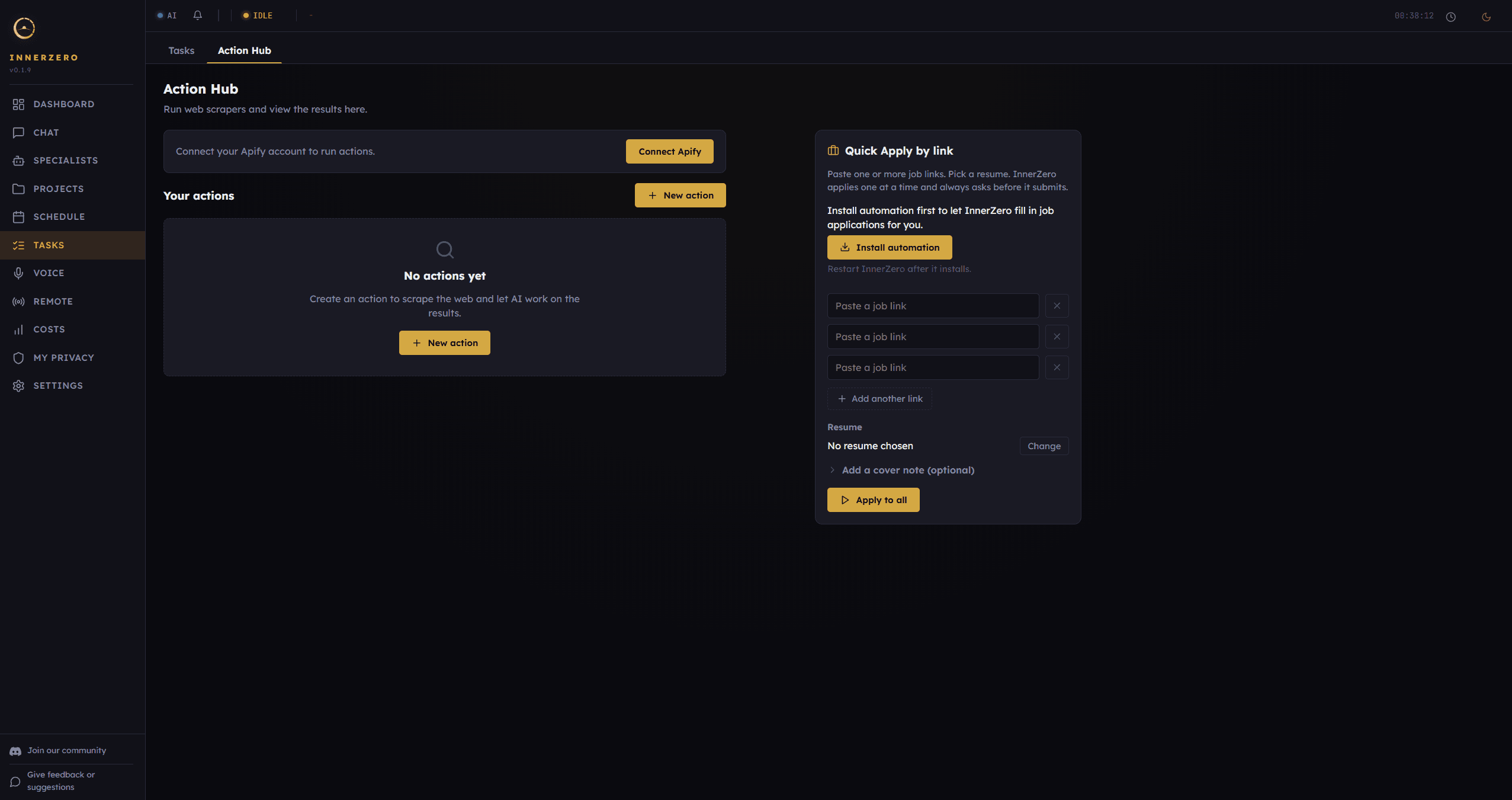
The Action Hub is an optional feature on the Tasks page, off by default. It has two parts. The first is web research: with your own Apify account and API key, the assistant can gather job listings and sources from the web for a goal you set. The second is apply assist, which helps fill in application forms from a profile you have saved.
Because the research runs under your own Apify account, that side is yours to control and yours to bill. InnerZero does not run the scraping for you on its servers.
How does the apply assistant work?
You save a job profile once: your name, contact details, links, a summary, and your skills and experience. When you ask the assistant to help with an application, it opens a fresh browser, fills the form from your saved profile, and pauses at the submit button.
The browser it uses is a clean one. It starts with no saved logins, no cookies, and no shared session, so it is not signed into your accounts and cannot reuse them. Your profile reaches the form and nothing else.
Does it submit applications on its own?
No. Every submission is gated behind your explicit approval. You can also keep the assistant in a draft-only mode, where it prepares the application for you to review and never submits at all. An automatic submit option was deliberately left out, so there is no way for it to send an application without a clear go-ahead from you.
This is the same approval pattern InnerZero uses for any action with real-world consequences. You see what is about to happen, and it only happens when you approve it.
How is this different from auto-apply bots?
Auto-apply services try to take you out of the process: you set some filters, and they fire off applications in the background. That is fast, but it is also how people end up applying to roles they never saw, with a CV they did not check, sometimes hundreds of times in ways that put employers off. InnerZero's apply assist works the other way round. It does the typing, but you choose each role, you can review the filled form first, and nothing is submitted without your approval. The goal is to save you the effort, not to take the decisions out of your hands.
What happens to my personal details?
Your job profile is stored locally on your machine, not in a cloud account. When you apply, your details go from your computer to the job or company website you chose, the same way they would if you had typed them in yourself. InnerZero does not receive, store, or proxy that information. It goes device to site.
If you ask for an AI-written cover note to go with an application, that runs on your local model by default. A cloud option exists for it, but it is off unless you turn it on for that action. The privacy approach behind all of this is covered in how InnerZero stays private.
What limits should I know about?
A few honest ones. The apply side works best on Windows in the current release. The browser guard governs where the assistant navigates, but no automated tool can promise that a third-party page will never try to send data somewhere of its own; you are choosing which sites to apply on, so apply on ones you trust. And you are responsible for the accuracy of what you submit and for following each site's own terms of service. The assistant helps you fill a form; it does not take responsibility for the application.
Used the way it is meant to be used, as an assistant that does the typing while you make the decisions, it takes a lot of the grind out of a job search without taking the wheel. For the bigger picture of running this locally, see what is a local AI assistant.
Frequently asked questions
Does it apply to jobs automatically?
No. Every submission requires your explicit approval, and there is a draft-only mode that never submits. There is no hands-off auto-apply.
Where do my application details go?
From your own machine to the job site you choose. InnerZero does not receive, store, or proxy them. Your saved profile stays on your computer.
Is my job profile stored in the cloud?
No. The profile is stored locally on your device.
Which platforms does the apply feature support?
It works best on Windows in the current release. The web research side uses your own Apify account.
Is it free?
The InnerZero app is free. The web research feature runs under your own Apify account, which has its own usage and pricing.
The point
AI can genuinely take the repetition out of a job hunt, but not by quietly applying for you. InnerZero's Action Hub helps with the research and the form filling, keeps your details on your machine, uses a clean browser, and stops for your approval before anything is sent. You stay the one deciding where to apply. Download InnerZero to try it, and see 5 things you can do right now for the rest.
Written by
Louie SummersFounder
Louie Summers is the founder of Summers Solutions Ltd and the sole developer of InnerZero, based in Birmingham, UK. Every post here is written by the person who builds the product.
Related Posts
A Private AI Assistant for Freelancers and Small Business
Freelancers and small teams handle client data they cannot pour into a cloud chatbot. InnerZero runs locally so client work stays on your machine. What it helps with, and how the Business Licence works.
2026-09-15
Asking AI About Health Questions Without the Privacy Cost
Health questions are some of the most personal things people type into AI. InnerZero runs locally, so you can ask without sending your symptoms to a server. What it can help with, and what it can't.
2026-09-04
I'm Looking For a Self-Hosted AI Assistant That Keeps My Data Private and Works Across My Apps. Which Tools Should I Compare?
Most local AI tools are just a chat box. Here is the honest shortlist of self-hosted AI assistants that connect to email, calendar, documents and your screen.
2026-08-16