
How to Get a Daily AI Briefing on Your PC, Privately
InnerZero's Proactive Assistant can deliver scheduled briefings and reminders to your chat on a schedule you set, composed locally from your own memory, mail, and calendar. Off by default.
Most AI assistants only do something when you open them and ask. That is fine, but it means the useful summary or the timely reminder only happens if you remember to go looking for it. InnerZero can work the other way round when you want it to: a Proactive Assistant that brings you a briefing on a schedule you set, put together on your own machine.
Quick summary
- InnerZero can deliver scheduled briefings and reminders to your chat on a schedule you choose.
- Briefings are composed locally from your own memory, mail, calendar, and knowledge packs.
- It is off by default, with quiet hours and an optional bridge to your phone.
- You decide what it covers, when it runs, and where it reaches you.
Can my AI assistant give me a daily briefing?
Yes. InnerZero's Proactive Assistant can run briefings and reminders on a schedule and deliver them to your chat. You might have a short morning summary waiting when you sit down, or a wind-down note in the evening, or a nudge before something on your calendar. It is off until you turn it on, so nothing arrives unless you have asked for it.
The difference from a normal chat is timing. Instead of you going to the assistant, the assistant comes to you at the moment you decided was useful.
What is a proactive AI assistant?
A proactive assistant is one that brings information to you on a schedule rather than only answering on demand. In practice that means two things: briefings, which are short summaries built from what you care about, and reminders, which are timed nudges. Together they turn the assistant from a tool you reach for into something closer to an aide that checks in.
How do I set up a daily briefing?
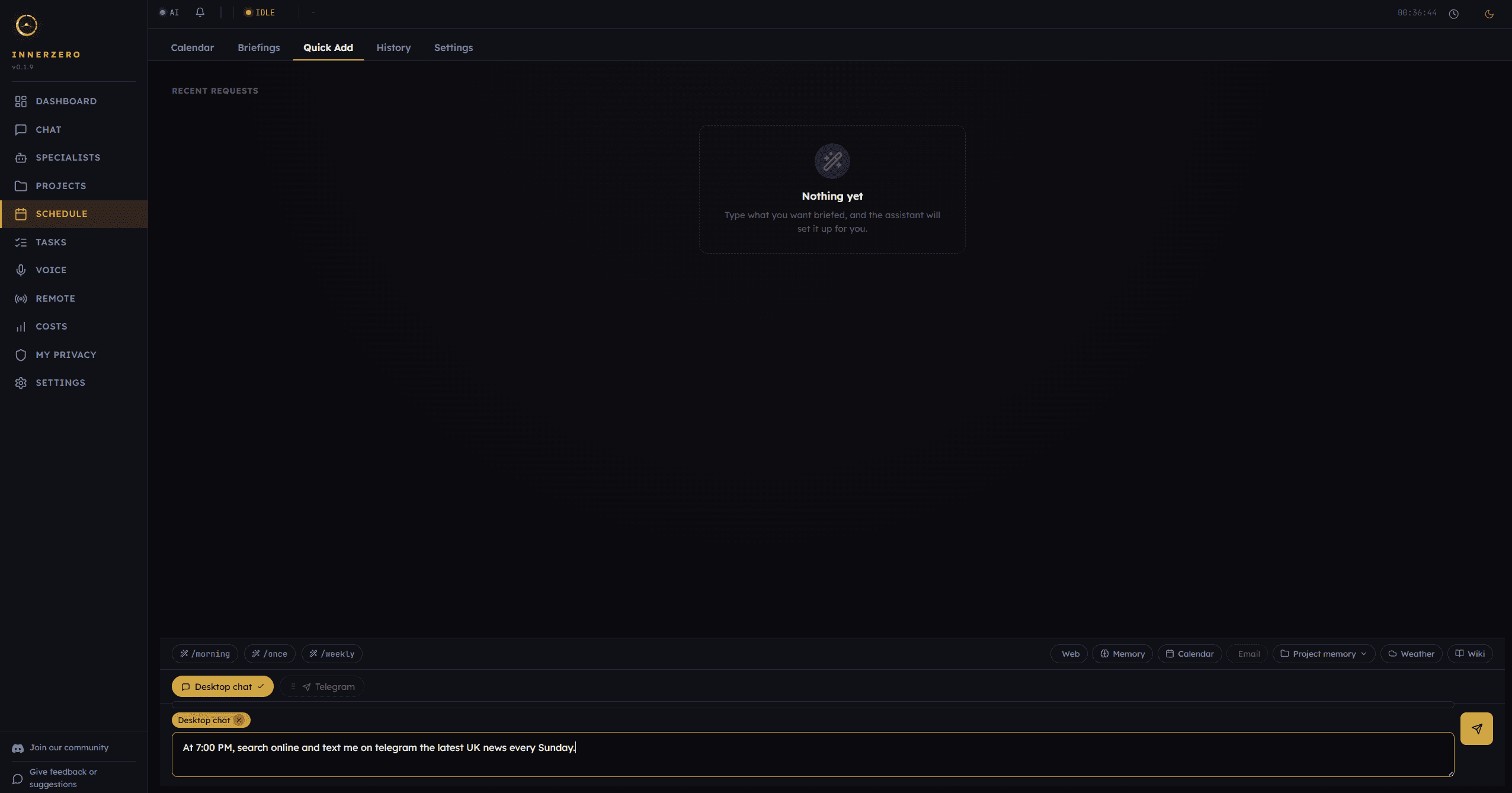
You schedule it, and you can do that in plain language. Type something like "remind me at 5pm tomorrow" or set a briefing for "every weekday at 9am", and the assistant works out the schedule. You pick what kind of briefing you want and when it should run. From there it arrives on its own until you change or pause it. For more of what the app does out of the box, see 5 things you can do right now.
What can a briefing include?
A briefing is composed from sources you have already connected, all on your machine. Depending on the type, it can pull from your saved memory, your calendar, your recent mail if you have connected Gmail, and your offline knowledge packs. The result is a summary that is actually about your day, not a generic feed.
There is a simple morning-style summary to start with, and InnerZero Pro adds extra briefing templates such as a daily learning note, an evening wind-down, a focus plan, and a monthly review, along with a higher limit on how many you can run. The core proactive feature is part of the free app.
A morning briefing might read like a short note: the two meetings you have today, a reminder that a report is due, and a line about an email that looks like it needs a reply. It is the kind of summary an assistant could only put together if it can see your own calendar, memory, and mail, which is exactly why doing it on your machine matters.
Can I use it just for reminders?
Yes. Not every proactive item has to be a summary. You can set plain reminders, a simple nudge at a time you choose, with no briefing attached. Tell it to remind you about something tomorrow afternoon, or every Friday morning, and that is all it does. Some people use the briefings, some use only the reminders, and many use both. It is a menu to pick from, not an all-or-nothing setting, so you can keep it as quiet or as active as you like.
Does it stay private?
Yes. Briefings are put together on your own hardware by the local model, so the assistant reading your memory and mail to build a summary does not send that off anywhere. Most briefing types are built to work with no internet at all, drawing only on what is already on your machine. The local-first idea behind this is explained in what is a local AI assistant.
If you want a briefing to reach you when you are away from your desk, there is an optional bridge to Telegram so it can arrive on your phone. That is off unless you set it up, and it is your choice whether to use it.
How is a briefing different from a news feed?
A news feed is built by an algorithm deciding what millions of people might click on. A briefing here is built from your own material: your calendar, your saved memory, and your mail if you have connected it. It is about your day rather than the day in general, and it is put together on your machine rather than chosen for you on a server somewhere. That makes it both more relevant and more private than a feed, because nothing about you is sent off to work out what you should see. You are not the product being sorted; you are the person being helped.
Can I control when it interrupts me?
Yes. You set the schedule, and quiet hours let you pause briefings during set windows so nothing arrives in the middle of the night or during a meeting. The whole system is off by default and entirely opt-in, so it only ever does what you have configured. You are in charge of what runs, when, and how it reaches you.
Frequently asked questions
Is the Proactive Assistant on by default?
No. It is off until you turn it on and set up a briefing or reminder. Nothing arrives unless you have configured it.
Where are briefings put together?
On your own machine. The local model composes the briefing from your connected sources, so your memory and mail are not sent anywhere to build it.
Can I get briefings on my phone?
Yes, optionally. There is a bridge to Telegram so briefings can reach your phone. It is off unless you set it up.
Do briefings work offline?
Most do. They draw on your local memory, calendar, and knowledge packs, so they work with no connection. A couple of news-style types use the web when you choose them.
Is it free?
Yes. The Proactive Assistant is part of the free InnerZero download. InnerZero Pro adds extra briefing templates and a higher limit.
The point
An assistant is more useful when it occasionally comes to you instead of waiting to be asked. InnerZero's Proactive Assistant does that on your terms: scheduled briefings and reminders, composed privately on your own machine, with quiet hours and an off-by-default switch so you stay in control. Download InnerZero and set up your first briefing.
Written by
Louie SummersFounder
Louie Summers is the founder of Summers Solutions Ltd and the sole developer of InnerZero, based in Birmingham, UK. Every post here is written by the person who builds the product.
Related Posts
A Private AI Assistant for Freelancers and Small Business
Freelancers and small teams handle client data they cannot pour into a cloud chatbot. InnerZero runs locally so client work stays on your machine. What it helps with, and how the Business Licence works.
2026-09-15
Is InnerZero Pro Worth It? An Honest Look
InnerZero is free and fully usable without paying. So what does InnerZero Pro add, what does it cost, and who should actually bother? A straight answer, with the free version's strengths included.
2026-09-11
How to Give Your Local AI Assistant a Personality
InnerZero lets you set how your assistant speaks, from professional to friendly to your own custom style. How personalities work, how to write your own, and why it changes the whole experience.
2026-09-08